
Most consumer routers are essentially locked black boxes that restrict your control. Opting for open-source firmware changes the power dynamic entirely, transforming a simple internet hub into a high-performance network controller.
You gain deep visibility into your traffic by prioritizing the Best Routers for Openwrt. This approach replaces hidden manufacturer constraints with total administrative authority over your home data flow.
Key Takeaways
- Prioritize devices with substantial RAM to ensure the firmware runs efficiently during heavy traffic loads.
- Verify that the hardware has dedicated mainline support to avoid long-term security vulnerabilities.
- Choose models with high-speed Ethernet ports if you plan on running resource-intensive VPN encryption protocols.
- Check the wireless chipset compatibility to ensure the radio drivers function reliably under custom software.
- Select hardware with sufficient storage space to accommodate custom package installations and ad-blocking databases.
| High Performance Powerhouse |  |
GL.iNet Flint 2 Wi-Fi 6 Router | Dual 2.5G ports | Fast Wi-Fi 6 speeds | Strong VPN throughput | View on Amazon | Read Review |
| Ultimate Portable Companion |  |
GL.iNet Opal Travel Router | Extremely lightweight | Easy to pack | Secure hotel connection | View on Amazon | Read Review |
| Tinkerer's Hardware Choice |  |
Banana Pi OpenWrt One Router | Official OpenWrt support | High quality DDR4 RAM | MediaTek chipset | View on Amazon | Read Review |
| Fast Mobile Connectivity |  |
GL.iNet Beryl AX Travel Router | 2.5G WAN port | Wi-Fi 6 speeds | Robust VPN performance | View on Amazon | Read Review |
| Reliable Mesh Starter |  |
Cudy AX3000 Wi-Fi 6 Router | Good mesh support | Four Gigabit ports | Simple app setup | View on Amazon | Read Review |
| Future Proof Speedster |  |
GL.iNet Flint 3 Wi-Fi 7 Router | Tri-band Wi-Fi 7 | Five 2.5G ports | Low latency performance | View on Amazon | Read Review |
| Best Home All-Rounder | 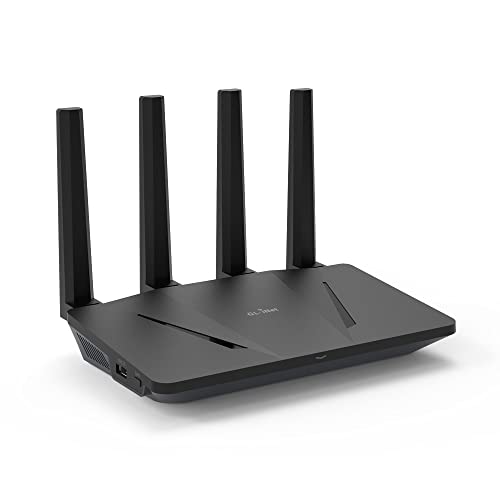 |
GL.iNet Flint Wi-Fi 6 Router | Handles 120 devices | Five Gigabit ports | Stable Wi-Fi 6 | View on Amazon | Read Review |
| Professional Wired Control |  |
TP-Link ER605 Gigabit VPN Router | Triple WAN support | Load balancing capabilities | Omada SDN integration | View on Amazon | Read Review |
| Gaming Performance Specialist |  |
GL.iNet Flint 3e Wi-Fi 7 Router | Wi-Fi 7 standards | Excellent gaming performance | High throughput capacity | View on Amazon | Read Review |
| Budget Travel Essential |  |
GL.iNet Mango Travel Router | Tiny pocket size | Very low power draw | Affordable entry point | View on Amazon | Read Review |
More Details on Our Top Picks
-
GL.iNet Flint 2 Wi-Fi 6 Router
If you want a router that handles heavy traffic without breaking a sweat, this is your best bet. It features dual 2.5G ports which ensure your wired connections are as fast as your wireless ones. The hardware is designed for power users who need reliable speed for gaming or streaming.
The main downside is that the unit is physically quite large compared to travel models. You will need a dedicated spot on your desk or shelf to accommodate its eight-stream Wi-Fi capabilities.
- Brand Name:GL.iNet
- Router Type:Desktop
- Wireless Standard:Wi-Fi 6
- Port Configuration:2.5G WAN and LAN
- VPN Compatibility:WireGuard and OpenVPN
- Additional Feature:Pre-installed OpenWrt firmware
- Additional Feature:Eight stream capacity
- Additional Feature:Gaming optimized performance
-
GL.iNet Opal Travel Router
This little device is essentially a Swiss Army knife for your network needs. It weighs only 145 grams, making it ideal for tossing into a laptop bag when you head out on a trip. It excels at turning unstable hotel Wi-Fi into a secure, private network for your devices.
Do not expect this to be your primary home router, as its range is limited by its compact size. It works perfectly for a single room or a small apartment, but it will struggle to cover a large house.
- Brand Name:GL.iNet
- Router Type:Travel
- Wireless Standard:AC1200
- Port Configuration:3 Gigabit ports
- VPN Compatibility:WireGuard and OpenVPN
- Additional Feature:Supports 30 plus VPNs
- Additional Feature:Pocket sized design
- Additional Feature:AdGuard Home support
-
Banana Pi OpenWrt One Router
This board is built specifically for those who love to get under the hood of their networking gear. With official OpenWrt support, you get a clean slate for custom configurations that most commercial routers simply do not allow. It is a fantastic foundation for building a personalized home network.
Since this is a more technical product, you should be prepared for a steeper learning curve than a standard off-the-shelf router. It lacks some of the plug-and-play polish you might find in consumer-grade equipment.
- Brand Name:Youyeetoo
- Router Type:Single Board
- Wireless Standard:Wi-Fi 6
- Port Configuration:RJ45
- Flash Memory:1GB RAM
- Additional Feature:Mainline kernel support
- Additional Feature:Open hardware design
- Additional Feature:Customizable network interface
-
GL.iNet Beryl AX Travel Router
The Beryl AX is a significant step up in speed for those who travel but still need a fast 2.5G connection. It provides a great balance of portability and raw performance, making it useful for remote work setups. You get enough throughput to run multiple VPN tunnels simultaneously.
While it is portable, it is slightly bulkier than the smaller travel routers in the lineup. You are trading a bit of pocket space for higher wireless speeds and a faster WAN port.
- Brand Name:GL.iNet
- Router Type:Travel
- Wireless Standard:Wi-Fi 6
- Port Configuration:2.5G WAN and Gigabit LAN
- VPN Compatibility:WireGuard and OpenVPN
- Additional Feature:USB 3.0 port
- Additional Feature:Dual band wireless
- Additional Feature:Compact form factor
-
Cudy AX3000 Wi-Fi 6 Router
If you want a straightforward router that plays nice with others, look at the Cudy WR3000. It offers solid Wi-Fi 6 coverage and supports mesh systems, which helps eliminate dead zones in your home. It is a no-nonsense choice for a modern household.
The interface is more traditional than the pure OpenWrt experience of other options on this list. You might find the software options slightly more restrictive if you are looking for advanced routing modifications.
- Brand Name:Cudy
- Router Type:Desktop
- Wireless Standard:Wi-Fi 6
- Port Configuration:4 Gigabit ports
- Additional Feature:App based management
- Additional Feature:Mesh network compatible
- Additional Feature:Efficient signal distribution
-
GL.iNet Flint 3 Wi-Fi 7 Router
Stepping into the world of Wi-Fi 7 gives you access to the 6GHz band, which is like having a private highway for your wireless devices. With five 2.5G ports, this router ensures that your wired backhaul is never a bottleneck. It is built to handle the future of 8K streaming and high-bandwidth tasks.
Because Wi-Fi 7 is still relatively new technology, you will pay a premium for the latest hardware. Ensure your devices actually support the new standards to get the most out of your purchase.
- Brand Name:GL.iNet
- Router Type:Desktop
- Wireless Standard:Wi-Fi 7
- Port Configuration:5 x 2.5G ports
- VPN Compatibility:WireGuard and OpenVPN
- Additional Feature:Tri-band connectivity
- Additional Feature:Gaming focused firmware
- Additional Feature:Advanced latency management
-
GL.iNet Flint Wi-Fi 6 Router
This model remains a favorite because it hits the sweet spot between price and performance. It handles up to 120 devices, which is more than enough for any modern smart home. The five Gigabit ports give you plenty of room to hardwire your most critical hardware.
It lacks the 2.5G ports found on the newer Flint 2 and Flint 3 models. If you have a multi-gig internet plan from your provider, you will be limited to 1Gbps speeds with this specific unit.
- Brand Name:GL.iNet
- Router Type:Desktop
- Wireless Standard:Wi-Fi 6
- Port Configuration:5 Gigabit ports
- VPN Compatibility:WireGuard and OpenVPN
- Additional Feature:AdGuard Home support
- Additional Feature:WPA3 security
- Additional Feature:Easy admin setup
-
TP-Link ER605 Gigabit VPN Router
This is a dedicated wired router that works perfectly as the brains of your network. It does not have built-in Wi-Fi, so you will need to add your own access points if you want wireless connectivity. It is a fantastic way to build a professional-grade network infrastructure.
The absence of wireless radio means this is not a one-box solution for average users. You have to be comfortable managing separate components to get your Wi-Fi up and running.
- Brand Name:TP-Link
- Router Type:Wired VPN
- Port Configuration:3 WAN and 2 LAN
- VPN Compatibility:IPsec, PPTP, L2TP, OpenVPN
- Additional Feature:Lightning protection
- Additional Feature:SPI firewall
- Additional Feature:Load balancing support
-
GL.iNet Flint 3e Wi-Fi 7 Router
The Flint 3e brings Wi-Fi 7 technology to a slightly more accessible tier of the lineup. It utilizes MLO and 4K-QAM to keep your gaming sessions smooth and your video calls crisp. It is a great middle-ground for those who want the latest wireless speeds without the top-tier price tag.
The port configuration is more modest than the full-sized Flint 3. It is designed to be efficient, so you might miss the extra multi-gig ports if you have a dense collection of wired devices.
- Brand Name:GL.iNet
- Router Type:Desktop
- Wireless Standard:Wi-Fi 7
- VPN Compatibility:WireGuard and OpenVPN
- Additional Feature:MLO support
- Additional Feature:4K-QAM efficiency
- Additional Feature:Streamlined gaming interface
-
GL.iNet Mango Travel Router
The Mango is the original pocket router that started it all for many travelers. It is incredibly tiny and draws so little power that it can run off a standard USB port. If you are looking for the most affordable way to secure your public Wi-Fi access, this is it.
Do not expect high-speed performance from this aging model. It is limited to 2.4GHz speeds and basic 10/100 Ethernet, so it is meant for simple browsing rather than heavy downloads or 4K streaming.
- Brand Name:GL.iNet
- Router Type:Travel
- Wireless Standard:2.4GHz
- Port Configuration:2 Ethernet ports
- VPN Compatibility:WireGuard and OpenVPN
- Additional Feature:USB 2.0 port
- Additional Feature:Public Wi-Fi converter
- Additional Feature:Simple admin panel
Frequently Asked Questions
Will installing OpenWrt void my warranty?
Yes, modifying the factory firmware almost always voids the manufacturer's warranty. You are essentially taking full control of the device, which means the original maker is no longer responsible for its behavior. Keep in mind that some companies are quite strict about this. If your router stops working after you flash it, do not expect a free replacement from the store.
Is it hard to flash the firmware?
It is usually a straightforward process if you follow the documentation for your specific model. Most devices allow you to upload the firmware through the standard web interface, just like a regular software update. However, you must be very careful to choose the correct file. Using the wrong image can brick your router, which means turning it into a useless piece of plastic.
Can I go back to the original software if I change my mind?
You can usually revert to the factory firmware by downloading the official file from the manufacturer's website. Most routers have a recovery mode or a specific button combination that lets you force a reinstall of the original code. It is a good practice to download a copy of the stock firmware before you start. Having that backup file on your computer provides a safety net if you decide to go back.
Does OpenWrt make my Wi-Fi faster?
OpenWrt does not magically change the physics of your wireless signal or the speed of your radio hardware. It can, however, improve performance by removing bloated background services that come with stock firmware. You might notice a snappier connection because the software is much more efficient. If your current router is slow because it is bogged down by unnecessary features, this swap will definitely improve responsiveness.
What should I do if my router is not on the compatibility list?
If your router is not on the official list, you should avoid using it for OpenWrt entirely. Attempting to install firmware on an unsupported device is like trying to put a square peg in a round hole. You will likely encounter broken features or unstable performance that you cannot fix. It is much better to sell your current unit and buy one that is specifically recognized by the project.