How much paper does your office push through the tray every single week? Keeping a business running is like tending a thirsty garden, and you need a reliable machine that never dries up when the deadlines start piling high.
Choosing among the Best High Volume Printers for Business requires a clear eye on your actual monthly output. These machines are the workhorses of your daily operations, and making the right choice now saves you hours of frustration later. Read on to see which models hold the most promise for your specific workflow.
Key Takeaways
- Prioritize your monthly duty cycle to ensure the machine can handle your actual volume without breaking down.
- Calculate the cost per page by looking at toner yield or ink efficiency rather than just the initial price tag.
- Check the input capacity to verify if the paper tray size matches your staff needs to reduce frequent refills.
- Confirm the network connectivity options meet your office infrastructure, such as Gigabit Ethernet or dual-band wireless.
- Decide if you truly need color capability, as monochrome laser machines often provide higher speeds and lower maintenance costs.
| Top Tier Workhorse |  |
HP Color LaserJet Enterprise 6800dn | Robust color printing | Reliable enterprise performance | Efficient heavy volume handling | View on Amazon | Read Review |
| Speed Demon Specialist |  |
Brother HL-6210DW Monochrome Laser | Exceptionally fast output | Massive paper capacity | Reliable monochrome quality | View on Amazon | Read Review |
| Productive Office Hub |  |
Brother MFC-L5915DW Laser All-in-One | High speed monochrome printing | Integrated scanning and copying | Reliable network performance | View on Amazon | Read Review |
| High Volume Powerhouse |  |
HP LaserJet Enterprise M608n | Blistering 65 ppm speed | Strong construction for longevity | Large capacity input | View on Amazon | Read Review |
| Versatile Color Specialist | 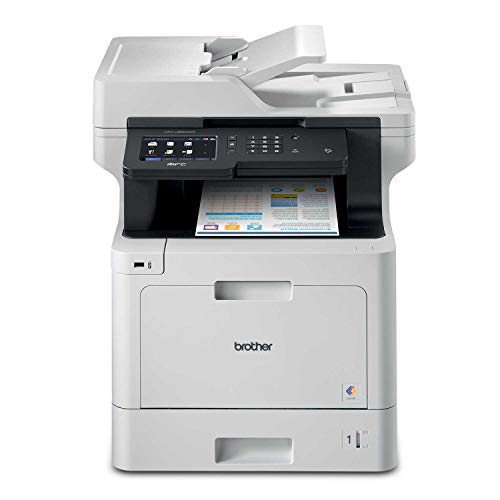 |
Brother MFC-L8900CDW Color Laser | Vibrant color output | Advanced scanning features | Customizable touch interface | View on Amazon | Read Review |
| Cost Efficient Workhorse |  |
Canon MAXIFY GX2020 MegaTank | Low cost per page | Integrated ink tanks | Complete business bundle | View on Amazon | Read Review |
| Wide Format Specialist |  |
HP OfficeJet Pro 9730 Wide-Format | Prints up to 11×17 | Versatile all-in-one functions | Reliable document feeder | View on Amazon | Read Review |
| Compact Color All-in-One |  |
Brother MFC-L3720CDW Color Laser | Reliable color printing | Compact, desk-friendly design | Easy wireless setup | View on Amazon | Read Review |
| Budget Friendly Inkjet |  |
Epson EcoTank ET-4800 Supertank | Extremely low ink cost | Easy to refill tanks | Solid connectivity options | View on Amazon | Read Review |
| Reliable Daily Driver |  |
HP LaserJet Pro 3101fdw Monochrome | Sharp monochrome output | Compact all-in-one design | Trusted office performance | View on Amazon | Read Review |
More Details on Our Top Picks
-
HP Color LaserJet Enterprise 6800dn
If your office demands consistent color output and heavy duty performance, this machine is your best friend. It manages high volumes without breaking a sweat, making it ideal for busy departments that cannot afford downtime.
The interface is intuitive, which reduces the learning curve for your staff. One minor drawback is that the physical footprint is quite substantial, so ensure your floor plan has space for a serious piece of equipment.
- Brand Name:HP
- Printer Type:Color Laser
- Connectivity Options:Ethernet, USB
- Functionality:Print, Scan, Copy
- Additional Feature:Enterprise level security features
- Additional Feature:Duplex printing included
- Additional Feature:Large input capacity
-
Brother HL-6210DW Monochrome Laser
This monochrome printer is built for one job: churning out crisp black and white documents at blistering speeds. It is perfect for legal firms or administrative offices that process massive stacks of text-based files daily.
You get a generous 520-sheet tray right out of the box, which keeps interruptions to a minimum. Do keep in mind that this is a single-function machine, so you will need a separate device if you also require scanning or copying capabilities.
- Brand Name:Brother
- Printer Type:Monochrome Laser
- Input Capacity:620 sheets
- Connectivity Options:Gigabit Ethernet, Wireless
- Functionality:Print
- Additional Feature:Dual-band wireless support
- Additional Feature:Automatic duplex printing
- Additional Feature:High speed document processing
-
Brother MFC-L5915DW Laser All-in-One
When you need a multitasker that keeps up with a fast-paced team, this model delivers 50 pages per minute. It is a solid choice for departments that rely on high-speed scanning and copying alongside their printing tasks.
The wireless networking is stable and easy to manage across a medium-sized team. The only limitation is the lack of color output, which makes it less suitable for marketing materials that require vibrant visuals.
- Brand Name:Brother
- Printer Type:Monochrome Laser
- Maximum Speed:50 ppm
- Connectivity Options:Wireless, Gigabit Ethernet
- Functionality:Print, Scan, Copy
- Additional Feature:Dual-band WiFi connectivity
- Additional Feature:Automatic two-sided printing
- Additional Feature:Professional grade document feeder
-
HP LaserJet Enterprise M608n
This machine is a classic example of raw power for a busy office environment. With print speeds reaching 65 pages per minute, it is designed to handle the most demanding print queues without slowing down your workflow.
The 650-sheet input capacity ensures that your team spends less time refilling trays throughout the day. Because this is a mono-only machine, it serves best as a dedicated engine for high-volume text documentation.
- Brand Name:HP
- Printer Type:Monochrome Laser
- Maximum Speed:65 ppm
- Input Capacity:650 sheets
- Connectivity Options:Gigabit Ethernet
- Functionality:Print
- Additional Feature:Clear LCD display interface
- Additional Feature:Automatic duplex printing
- Additional Feature:Enterprise networking capabilities
-
Brother MFC-L8900CDW Color Laser
If your business needs a mix of high quality color prints and high-speed scanning, this Brother unit covers all the bases. It is a smart pick for design-heavy offices that need to produce professional presentations on a daily basis.
The interface is highly customizable, which allows your team to streamline repetitive tasks with shortcut buttons. Keep in mind that replacing a full set of color toner cartridges can get pricey, so factor that into your long-term budget.
- Brand Name:Brother
- Printer Type:Color Laser
- Connectivity Options:Wireless, Gigabit Ethernet
- Functionality:Print, Scan, Copy, Fax
- Additional Feature:Amazon Dash Replenishment ready
- Additional Feature:Large touchscreen control
- Additional Feature:Fast scanning speeds
-
Canon MAXIFY GX2020 MegaTank
This inkjet printer uses a tank system instead of traditional cartridges, which significantly lowers your per-page costs. It is an excellent choice for a small business that produces a high volume of documents but wants to keep ink expenses under control.
The bundle includes everything you need to get started, making it a convenient entry point for a new office. It is not as fast as a laser printer, so it might struggle if you have a massive queue waiting all at once.
- Brand Name:Canon
- Printer Type:Inkjet
- Connectivity Options:Wireless, Ethernet
- Functionality:Print, Scan, Copy, Fax
- Additional Feature:High volume document printing
- Additional Feature:Included cleaning kit
- Additional Feature:Compact design
-
HP OfficeJet Pro 9730 Wide-Format
When you need to print spreadsheets or charts on 11×17 paper, this wide-format printer is your go-to solution. It offers the flexibility of a professional office machine without requiring a massive dedicated print room.
The automatic document feeder makes scanning multi-page contracts a breeze. One trade-off is that inkjet technology is generally slower than laser alternatives, so it is better suited for offices that prioritize format size over raw output speed.
- Brand Name:HP
- Printer Type:Inkjet
- Connectivity Options:Wireless
- Functionality:Print, Scan, Copy, Fax
- Additional Feature:Wide format scanning
- Additional Feature:Two-sided scanning and printing
- Additional Feature:Professional office design
-
Brother MFC-L3720CDW Color Laser
This is a great option for offices that are tight on square footage but still need color laser quality. It fits neatly on a desk or small stand while providing all the essential features like copying and faxing.
The wireless connectivity allows your whole team to connect with ease from anywhere in the room. Just be aware that the paper capacity is standard, meaning you will need to refill the tray more often than with enterprise-class machines.
- Brand Name:Brother
- Printer Type:Color Laser
- Input Capacity:250 sheets
- Connectivity Options:Wireless
- Functionality:Print, Scan, Copy, Fax
- Additional Feature:Automatic duplex printing
- Additional Feature:Amazon Dash Replenishment ready
- Additional Feature:Seamless scan functionality
-
Epson EcoTank ET-4800 Supertank
By utilizing cartridge-free ink tanks, this printer saves you from the cycle of buying expensive replacements. It is a fantastic choice for home offices or small teams that produce a high volume of mixed color and monochrome documents.
The setup is quite straightforward, and the Ethernet connection provides a stable link for your office network. Because it uses ink rather than laser toner, it is not designed for the extreme high-speed output required by a busy corporate floor.
- Brand Name:Epson
- Printer Type:Inkjet
- Connectivity Options:Ethernet, Wireless
- Functionality:Print, Scan, Copy, Fax
- Additional Feature:Automatic document feeder
- Additional Feature:Compact white chassis
- Additional Feature:High capacity tank system
-
HP LaserJet Pro 3101fdw Monochrome
This monochrome laser printer is built for consistent, day-to-day productivity in a professional office. It handles text documents with precision, delivering clean lines and sharp black text every time you hit print.
The all-in-one capability means you can clear out your bulky standalone copier and scanner to save space. It is a dependable choice, though it lacks the sheer speed and heavy paper capacity of the larger enterprise models.
- Brand Name:HP
- Printer Type:Monochrome Laser
- Connectivity Options:Wireless, Ethernet
- Functionality:Print, Scan, Copy, Fax
- Additional Feature:Secure document handling
- Additional Feature:Automatic two-sided printing
- Additional Feature:Fast first page output
Frequently Asked Questions
Should I choose an inkjet or a laser printer for high volume work?
You should almost always go with a laser printer for heavy workloads. Laser printers use toner, which is dry, faster to apply, and significantly cheaper to run over thousands of pages. Inkjet printers are better suited for photo quality output or very low volume use at home.
What does a recommended monthly print volume actually mean?
While the duty cycle is the maximum limit, the recommended monthly volume is the sweet spot for your machine's longevity. This is the range where the internal parts experience the least amount of wear and tear. If you stay within this range, your printer will likely last years without needing an expensive service call.
Is it cheaper to buy third party toner cartridges?
Using non-brand toner might save you money upfront, but it carries a significant risk to your hardware. Third party cartridges often leak or use inferior powder that can clog your print heads or drums. Stick to genuine manufacturer supplies to maintain your warranty coverage and protect your machine from internal damage.
Why does my printer slow down when I print color?
Printing in color requires the machine to process data for four distinct colors, which is like juggling four balls instead of one. The printer must align all these layers precisely on the page, which naturally takes more time than simple black text. If you print primarily documents and memos, set your default settings to grayscale mode to keep your speeds high.
Do I really need a printer with a touch screen display?
A color touch screen makes navigating settings and troubleshooting errors much easier for your team. Instead of deciphering blinking light codes, you can read clear instructions or follow step-by-step guides for clearing paper jams. It is a small feature that significantly reduces the frustration factor during busy workdays.