
A decade ago, setting up a home studio required a small fortune for entry-level gear that sounded mediocre at best. Today, the technology has caught up with the ambition of creators everywhere.
You can now find surprisingly accurate audio gear without spending a month of rent. These Best Cheap Studio Monitors allow you to hear your mix with genuine clarity. Keep reading to see how these compact units perform.
Key Takeaways
- Prioritize a flat frequency response to ensure you are hearing the recording as it was intended.
- Check that the physical footprint of the speaker matches the available space on your workstation.
- Verify the input options to ensure they match your audio interface or computer output hardware.
- Look for a pair that includes both a woofer for low-end punch and a tweeter for high-frequency detail.
- Consider whether you need specialized connectivity like Bluetooth or physical tone controls for room correction.
| Industry Standard Starter |  |
KRK Kreate 3 Powered Monitors | Accurate frequency response | Compact desktop design | Reliable brand pedigree | View on Amazon | Read Review |
| Versatile Desktop Staple |  |
PreSonus Eris 3.5 Active Monitors | Tight low end response | Smooth high frequency detail | Excellent for small desks | View on Amazon | Read Review |
| Modern Wireless Solution |  |
Ortizan C7 Dual-Mode Monitors | Bluetooth 5.3 connectivity | Active internal amplification | Minimalist cable setup | View on Amazon | Read Review |
| High Resolution Performer |  |
Edifier MR3 Powered Studio Monitors | Hi-Res audio certified | Balanced TRS input | Modern Bluetooth 5.4 | View on Amazon | Read Review |
| Intuitive Sound Control |  |
Mackie CR3.5 Creative Reference Monitors | Convenient tone knob | Smart location switch | Easy desktop integration | View on Amazon | Read Review |
| Faithful Sonic Reference |  |
Yamaha HS4 Powered Studio Monitors | Highly accurate response | Flat frequency curve | Professional monitoring heritage | View on Amazon | Read Review |
| Dual Mode Flexibility | 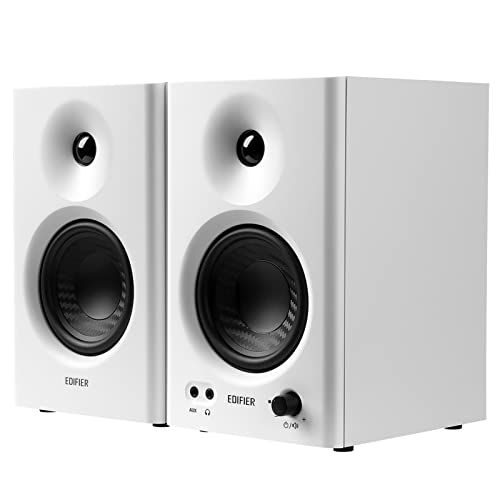 |
Edifier MR4 42W Monitor Speakers | Switchable monitoring modes | Solid 4 inch woofer | Diverse input options | View on Amazon | Read Review |
| Wide Sweet Spot |  |
PreSonus Eris E7 XT Monitor | Wide EBM waveguide | Extended low frequency response | Stable stereo imaging | View on Amazon | Read Review |
| Feature Loaded Powerhouse |  |
Rockville ASM4 Powered Studio Monitors | High peak power output | Extensive input variety | Integrated DSP tuning | View on Amazon | Read Review |
| Compact Coaxial Precision | 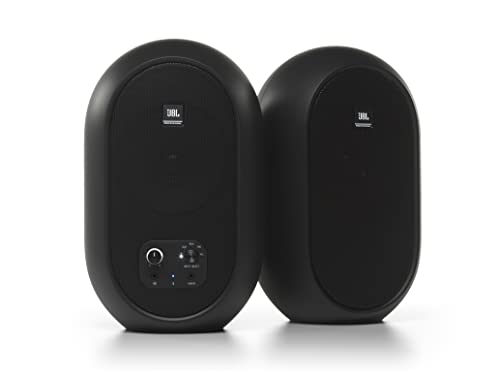 |
JBL 104-BT Coaxial Monitors | Coaxial driver alignment | Focused stereo image | Front headphone output | View on Amazon | Read Review |
More Details on Our Top Picks
-
KRK Kreate 3 Powered Monitors
If you are putting together a home studio workspace, these monitors provide the reliability you expect from a name synonymous with production. They offer a balanced sound profile that helps you hear exactly what is happening in your mix without the artificial bass boost found in consumer speakers.
Keep in mind that their compact footprint means they prioritize desktop space over deep sub-bass performance. They act as a clear window into your audio, making them a solid choice for anyone transitioning from casual listening to serious music production.
- Brand:KRK
- Model:Kreate 3
- Quantity:Pair
- Additional Feature:Powered active design
- Additional Feature:Near field monitoring
- Additional Feature:Studio grade accuracy
-
PreSonus Eris 3.5 Active Monitors
These speakers remain a favorite for creators who need a multi-purpose setup that handles gaming and video editing just as well as music production. The woven-composite woofer manages the low end with surprising tightness for such a small cabinet.
You might find the silk-dome tweeter provides a crisp high-end response that is smooth rather than harsh. While they are not meant for filling a large room, they excel at close range on a crowded desk.
- Brand:PreSonus
- Model:Eris 3.5
- Driver Size:3.5 inch
- Power Output:50 Watts
- Quantity:Pair
- Additional Feature:Active near field design
- Additional Feature:Silk dome tweeter
- Additional Feature:Woven composite woofer
-
Ortizan C7 Dual-Mode Monitors
Sometimes you just want to get rid of the clutter of cables while maintaining a solid connection to your computer. These speakers offer Bluetooth 5.3 integration, which makes switching between your DAW and your phone an effortless process.
Because they function as active monitors, you do not need an external amplifier to get them running. They are perfect for creators who prioritize convenience and want a clean, minimalist setup for their bedroom studio.
- Brand:Ortizan
- Model:C7
- Quantity:Pair
- Additional Feature:Dual mode operation
- Additional Feature:Wireless streaming support
- Additional Feature:Near field capability
-
Edifier MR3 Powered Studio Monitors
If you demand high-resolution audio certification, these speakers serve as a bridge between professional monitoring and high-fidelity listening. They provide a balanced TRS input, which is a vital feature for reducing interference in a professional studio environment.
The inclusion of Bluetooth 5.4 ensures that your wireless connection remains stable and efficient. Just ensure you have enough room, as these perform best when placed on stands slightly away from the wall.
- Brand:Edifier
- Model:MR3
- Connectivity:Bluetooth, TRS, RCA, AUX
- Quantity:Pair
- Additional Feature:Headphone output jack
- Additional Feature:Active loudspeaker design
- Additional Feature:Balanced audio support
-
Mackie CR3.5 Creative Reference Monitors
Mackie designs these for the user who likes to tweak their sound on the fly. The front-mounted tone knob allows you to adjust your audio profile without digging through software menus, which is like having a quick-access dashboard for your ears.
The location switch is a smart inclusion that helps calibrate the sound based on where you sit in the room. They are straightforward tools that get the job done without unnecessary complexity.
- Brand:Mackie
- Model:CR3.5
- Driver Size:3.5 inch
- Quantity:Pair
- Additional Feature:Active power design
- Additional Feature:Creative reference tuning
- Additional Feature:Front panel controls
-
Yamaha HS4 Powered Studio Monitors
Yamaha is famous for speakers that tell you the honest truth about your mix. The HS4 monitors follow this tradition by delivering a flat response that keeps your production decisions accurate and repeatable.
They work like a magnifying glass for your audio. If there is an error in your tracking, you will certainly hear it here, which makes them ideal for mixing and critical listening tasks.
- Brand:Yamaha
- Model:HS4
- Quantity:Pair
- Additional Feature:Powered active design
- Additional Feature:Near field performance
- Additional Feature:Studio grade build
-
Edifier MR4 42W Monitor Speakers
These monitors offer a clever way to toggle between a flat monitoring mode for work and a boosted music mode for leisure. The 4-inch woofer provides a bit more oomph in the low end than smaller competitors, which helps when you are tracking bass-heavy genres.
You get a versatile set of inputs, including balanced TRS, which allows for a clean signal path from your audio interface. They are a workhorse speaker that handles a variety of media sources with ease.
- Brand:Edifier
- Model:MR4
- Driver Size:4 inch
- Power Output:42 Watts
- Connectivity:TRS, RCA, AUX
- Quantity:Pair
- Additional Feature:1 inch tweeter
- Additional Feature:Dedicated music mode
- Additional Feature:PC and console compatible
-
PreSonus Eris E7 XT Monitor
The EBM waveguide technology on these monitors creates a remarkably wide sweet spot in your room. This means you do not have to keep your head in a fixed position to get an accurate stereo image, which is a relief during long editing sessions.
These are larger than typical desktop units and offer a deeper reach into the low frequencies. Use these if you have a dedicated studio space and need a soundstage that feels expansive and immersive.
- Brand:PreSonus
- Model:Eris E7 XT
- Quantity:Single unit
- Additional Feature:2-way active design
- Additional Feature:Waveguide technology
- Additional Feature:Professional studio acoustics
-
Rockville ASM4 Powered Studio Monitors
If you want to plug everything into one place, these speakers are your best friend. They come packed with optical and Bluetooth inputs, making them a central hub for your entire multimedia setup.
The DSP tuning ensures that the output remains consistent, while the silk dome tweeter keeps the high frequencies clear. With 200 watts of peak power, they possess plenty of headroom for louder sessions.
- Brand:Rockville
- Model:ASM4
- Driver Size:4 inch
- Power Output:200 Watts Peak
- Connectivity:Bluetooth, Optical, TS, RCA
- Quantity:Pair
- Additional Feature:Bass port design
- Additional Feature:Class D amplification
- Additional Feature:Silk dome tweeter
-
JBL 104-BT Coaxial Monitors
These monitors use a coaxial design where the tweeter is mounted in the center of the woofer. This alignment helps the sound arrive at your ears at the same time, providing a sharp and focused image that is excellent for desktop environments.
The front-facing headphone jack is a thoughtful touch for quick tracking sessions or late-night editing. They are small enough to sit unobtrusively on any desk while maintaining a professional reference-grade sound.
- Brand:JBL
- Model:104-BT
- Driver Size:4.5 inch
- Power Output:60 Watts
- Connectivity:Bluetooth, TRS, RCA, AUX
- Quantity:Pair
- Additional Feature:Class D amplification
- Additional Feature:Soft dome tweeter
- Additional Feature:Compact desktop form
Frequently Asked Questions
Do I need a separate subwoofer for my studio monitors?
Most people do not need one if they are working in a small room. A decent set of five-inch monitors covers enough of the low-frequency spectrum for most music production tasks. Adding a subwoofer often introduces more acoustic problems than it solves unless your room is professionally treated.
Why do my monitors sound different than my headphones?
Headphones deliver sound directly into your ears, removing the room acoustics from the equation. Monitors interact with your walls, desk, and ceiling, which colors the sound you hear. You should use both to compare your work and find a balance that translates well to other systems.
Can I use studio monitors for casual music listening?
You certainly can, though the experience will feel different than using consumer speakers. Studio monitors are designed for critical listening, so they will reveal every flaw in a recording. They provide a clear, detailed window into your music rather than a flattering, colored sound.
What is the best way to position monitors on my desk?
Aim to form an equilateral triangle between your head and the two speakers. Tilt the monitors inward so the tweeters are pointed directly at your ears. This helps maintain a solid stereo image, which is essential for placing instruments correctly in your mix.
Do I need expensive cables to get good sound?
You need sturdy, shielded cables, but you do not need to spend a fortune. Look for balanced cables with high-quality connectors to prevent unwanted buzzing. As long as the build is solid, the cable will transfer the signal accurately without needing gold-plated marketing gimmicks.